| |
Counters
Click on the links below for Counters available online.
|
Veeder-Root - Model V4545
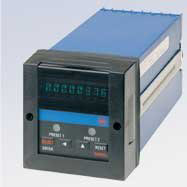
This 1/16 DIN size counter can accept inputs from a wide variety of sources including encoders and proximity switches, and scale those signals into meaningful units of measure. The V4545 Preset Counter is well suited for applications such as cut-to-length and filling. Dual input channels, which can be used for reversible or quadrature counting, enhance the unit's versatility. |
 |
| |
|
|
Veeder-Root C628 Awesome Counter
The Veeder-Root brand C628 Counters are members of a family of 1/8 DIN instruments which offer breakthrough display technology as well as easy-to-program user setup. The large LED display features the ability to change color based on process status such as exceeding the count preset. Therefore, when monitoring count, position, length, or other critical values, the C628 provides operators with an instant visual alert to changes in the application's status. |
 |
| |
|
|
ATC 366 High Speed Counter
The ATC 366B’s three-digit cycle progress display will count UP to or DOWN from the set point, depending on the position of an internal jumper. After count-out, the display will either STOP or GO. In the UP & GO program, the display counts up to the set point and continues to count after count-out; in the DOWN & GO mode, it counts down to the set point, then begins to count up (from zero) after count-out.
|
 |
| |
|
|
376B Digital Counter
The 376B is available as a Single Preset or a Dual Preset Counter. The Dual Preset Counter can be set as a Batch Counter. Both the Single Preset and the Dual Preset versions have an internal Totalizing Counter which will accumulate counts over numerous cycles. The 376B can be set up for Interval
HIGH SPEED COUNTING
The Single Preset 376B counts at a maximum frequency of 10 kHz. In addition to its high speed capabilities, a debounce circuit can be enabled to limit the count frequency to 100 Hz.
|
 |
| |
|
|
356 Digital Counter
The ATC 356 counter is easily and accurately set even with work gloves on. Push any of its four toggle levers in any sequence until the number you want appears above it. You can decrease as well as increase each number by pushing the levers up or down. You can change the setting at any time, even during a cycle. |
 |
| |
|
|
|
|
|
|